Table of Contents
- Assess the Damage: Is Your iPhone Safe to Use?
- Immediate Steps After Cracking Your iPhone Screen
- How to Protect a Cracked Phone Screen Until Repair
- DIY iPhone Screen Repair: Tools, Steps, and Risks
- iPhone Screen Replacement Cost by Model and Repair Route
- iPhone Screen Replacement Time: What to Expect
- Warranty, Insurance, and Post-Repair Checks
- Conclusion: Choosing the Best Repair Path for Your iPhone
- Frequently Asked Questions
Last Updated: October 15, 2026
Assess the Damage: Is Your iPhone Safe to Use?
Knowing how to fix cracked iPhone screens is not always an emergency, but it always needs a decision. Assess the damage before you touch anything or book a repair.
This guide walks you through how to fix a cracked iPhone screen the smart way.
Start with three quick checks:
- Does the display still light up and show a clear image?
- Does the touchscreen respond across the whole screen?
- Is any glass missing, or can you see internal parts?
If all three answers are “no problem,” you likely have a cosmetic crack. If any is “yes,” you have a real repair on your hands.
Small Crack vs. Major Break: What Each Means for Your Phone
A small crack is surface damage to the glass only. The display underneath still works. Touch response is normal. You can often keep using the phone for days or weeks.
A major break means the glass is shattered, pieces are missing, or the image is damaged, black spots, colored lines, or a display that flickers or stays dark.
Here is the difference that matters:
| Damage Type | What You See | Urgency |
|---|---|---|
| Small crack | Hairline crack, no missing glass | Low, but cover it |
| Spiderweb crack | Multiple cracks, glass intact | Medium |
| Missing glass | Exposed display or frame | High |
| Dead zones | Touch fails in spots | High |
| Display damage | Lines, black spots, no image | Urgent |
Exposed glass and open seams let dust and moisture reach the display and battery. A phone with missing glass can go from a simple screen replacement to a full device failure in days.
Immediate Steps After Cracking Your iPhone Screen
Stop using the phone for anything risky the moment you notice the crack. The next 10 minutes decide whether this stays a screen repair or becomes a data recovery job.
Do these steps in order:
- Power the phone off if the screen is badly broken or hot to the touch.
- Do not press on the cracked area to test it. You will push glass into the display.
- Back up your data now while the phone still turns on. Use iCloud backup or a cable to a computer.
- Cover the screen with clear tape or a temporary screen protector to hold glass in place.
- Note what still works: touch, camera, face unlock, charging.
If the phone will not turn on at all, skip ahead to the backup section below. Data comes first.
How to Protect a Cracked Phone Screen Until Repair
A cracked screen you want to fix cracked iPhone damage on gets worse with every pocket, purse, and table edge it meets. Protecting it is simple and cheap.
- Apply clear packing tape over the crack as a temporary shield.
- Use a case with a raised lip so the screen never touches a flat surface.
- Keep it out of pockets with keys or coins.
According to Apple’s official support guidance on iPhone water resistance, water and dust resistance depends on a sealed device, and a cracked screen breaks that seal.
Photograph the damage before you tape it up. A clear photo of the crack helps any repair technician quote the job accurately and confirms the condition of the phone before you hand it over.
DIY iPhone Screen Repair: Tools, Steps, and Risks
DIY iPhone screen repair is possible, but difficulty, parts, and safety risk all scale with the generation.
Safety Triage Before You Touch Anything
Do this before any repair attempt:
- Exposed glass. Wear eye protection and cut-resistant gloves, use tweezers (never bare fingers) to lift shards, and tape over the crack.
- Heat. If the phone is hot, unplug it and let it cool away from anything flammable. Heat plus a damaged battery is dangerous.
- Swelling. A bulging screen, a case that no longer fits, or a phone that rocks on a flat surface means the battery is swelling. Do not press, pry, or charge it, move it to a fire-safe surface and get it to a professional.
Never pry near the battery with a metal tool. A punctured battery can vent, swell, or catch fire. If you smell anything sweet or chemical, stop and move the phone outside.
Model-Specific Difficulty Tiers
Difficulty scales with how the phone was assembled:
| Tier | What It Looks Like | DIY Feasibility |
|---|---|---|
| Entry | Older models with home buttons, LCD panels, fewer adhesive layers | Reasonable for a careful first-timer |
| Intermediate | Mid-generation models with OLED panels and more adhesive | Doable with the right tools, higher risk |
| Advanced | Current-generation models with laminated OLED, tight tolerances, and software pairing checks | Not recommended for most DIYers |
The jump between tiers is not linear: a 30-minute, four-screw job can become an hour-long job with heat, adhesive, and calibration one generation up.
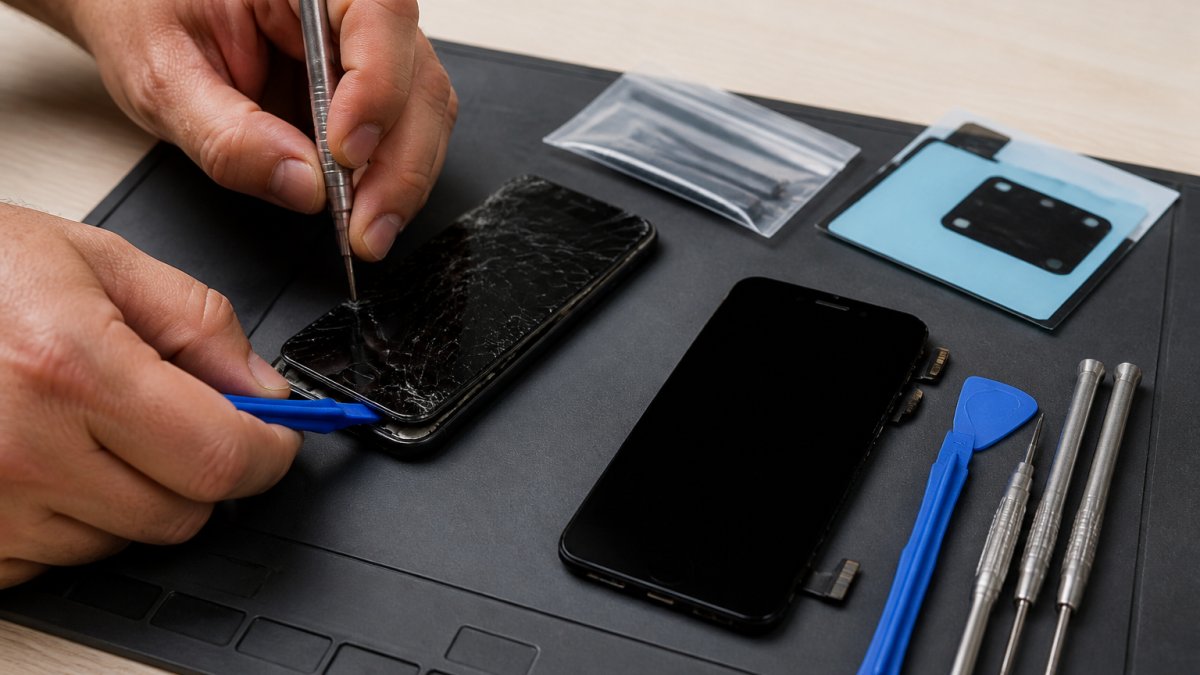
Tools and Parts You’ll Need
- A replacement screen assembly matched to your exact phone model
- Pentalobe and Phillips screwdrivers
- A plastic opening tool and suction cup
Step-by-Step Screen Replacement Process
- Power the phone off and remove the SIM tray.
- Remove the two bottom screws with a pentalobe driver.
- Heat the edges to soften the adhesive.
- Lift the screen slowly with a suction cup and opening tool.
- Disconnect the battery before touching any display cables.
- Remove the display connectors and lift out the old screen assembly.
- Fit the new assembly, reconnect cables, and test before sealing.
- Reseal the phone and replace the screws.
Plan on 30 minutes for an entry-tier model and closer to an hour for advanced tiers.
Risks of DIY Repair
The biggest risk is not a broken part, but damage you cannot see.
- Cracked display glass can cut internal cables during removal.
- Prying in the wrong spot can damage the frame or battery.
- Non-original parts can trigger warning messages on newer iPhones.
Post-Repair Checks Before You Close the Phone
Run these before you reseal, so you can fix a mistake while the phone is still open:
- Touch responds across the entire screen, including corners and edges
- Front camera and face unlock work
- Display brightness and True Tone behave normally
If you are not confident in the tier your phone falls into, the honest answer is that DIY is the wrong route. A professional repair that preserves your data and your water resistance is usually cheaper than a second repair after a failed first attempt.
iPhone Screen Replacement Cost by Model and Repair Route
iPhone screen replacement cost depends on your model, the repair route, and whether the glass alone can be replaced. Here is the framework that lets you budget.
Why the Price Spread Is So Wide
Three hardware factors drive the number:
- Display technology. Older LCD panels are cheaper to source and replace than laminated OLED panels.
- Adhesive and seal complexity. Newer models use more adhesive and tighter gaskets, adding labor time and requiring replacement seals.
- Calibration and pairing. Some newer iPhones require display calibration or pairing after replacement, which independent shops handle but DIY kits usually cannot.
A glass-only repair, where the display underneath is fine, is usually cheaper than a full assembly swap because you are not paying for the panel. The trade-off: glass-only work needs specialized laminating equipment most people do not own.
Rough Cost Tiers to Expect
Exact prices vary by shop, region, and current parts availability, so treat these as planning tiers rather than quotes:
| Model Tier | Typical Independent Shop Range | Typical Manufacturer Out-of-Warranty Range | DIY Parts Cost |
|---|---|---|---|
| Older LCD models | Lower end of the market | Higher than independent | Lowest |
| Mid-generation OLED models | Mid range | Higher than independent | Mid range |
| Current-generation OLED models | Highest independent tier | Highest overall | Highest, plus tool cost |
A common pattern is that independent shops land meaningfully below manufacturer out-of-warranty pricing on the same model, while DIY parts sit below both but add tool cost and risk. For current official numbers on your exact model, Apple’s official repair pricing page lists manufacturer rates, and our own price list covers the same models at our Henderson shop.
The Insurance Math Nobody Runs
If you carry device insurance, the deductible is often lower than out-of-pocket replacement on a current-generation model but higher than an independent shop quote on an older one. Run both numbers before you file, claims can affect future premiums, so a small crack on an older phone is often cheaper to pay directly.
What Changes the Quote
- Bent frame. If the chassis is warped, the new screen may not seat properly and the job grows.
- Battery damage. A swollen or punctured battery adds a second part and a safety step.
- Back glass damage. On models with a glass back, that is a separate repair with its own price.
Ask for a quote that separates parts, labor, and any calibration step. A single lump-sum number hides which of the factors above is driving your price.
| Repair Route | Best For | Trade-Off |
|---|---|---|
| Glass-only repair | Small cracks, working display | Needs special equipment |
| Screen assembly swap | Most cracked screens | Higher part cost |
| Professional service | Newer models, warranty concerns | Booking required |
| DIY kit | Older models, tight budgets | Higher risk of damage |
iPhone Screen Replacement Time: What to Expect
iPhone screen replacement time runs from 30 minutes to a few hours depending on the model and route.
A straightforward assembly swap on an older iPhone takes about 30 minutes; newer models with more adhesive and calibration steps take closer to an hour. A bent frame or damaged battery adds time.
If you need the phone working by tomorrow for work, call ahead and ask about same-day availability. At iPhone & iPad Repair Center, our extended hours including weekends make it easier to get a phone fixed.
Warranty, Insurance, and Post-Repair Checks
Warranty and insurance change the math on repair. If your phone is still under manufacturer warranty, an unauthorized repair can void coverage. Check your coverage before you open the device.
If you have device insurance, file a claim first. The deductible is often lower than a full out-of-pocket screen replacement.
After any repair, run these checks:
- Test touch across the entire screen
- Check the front camera and face unlock
- Confirm the display brightness and True Tone work
The repair is not finished when the screen lights up. A two-minute post-repair check catches most problems while you are still standing at the counter.
Conclusion: Choosing the Best Repair Path for Your iPhone
A cracked iPhone screen is a decision, not a disaster. Small cracks can wait with tape and a case. Major breaks need a technician fast. DIY only makes sense on older models where the risk matches the savings.
If you want it done right the first time, iPhone & iPad Repair Center offers specialized screen, battery, and charging port repairs for iPhones, iPads, MacBooks, laptops, and gaming consoles.
Frequently Asked Questions
What should I do immediately after cracking my iPhone screen?
Power down the phone if the screen is severely shattered, then back up your data to iCloud or a computer as soon as possible. Apply clear packing tape or a temporary screen protector over the cracks to prevent cuts and further damage. Avoid pressing on the broken glass, and bring the phone to a repair professional for assessment. Quick action reduces the risk of injury and additional internal damage.
How much does an iPhone screen replacement cost?
The iPhone screen replacement cost varies by model, repair route, and whether you choose DIY parts or professional service. Apple’s out-of-warranty pricing is typically higher than independent repair shops, while DIY kits cost less but carry installation risks. For a specific quote on your model, check with a local repair center or the manufacturer’s website. Prices also depend on whether the repair includes only the glass or the full screen assembly.
Can I fix a cracked iPhone screen myself?
DIY iPhone screen repair is possible if you have the right tools, a genuine replacement part, and experience with small electronics. You’ll need a screwdriver set, opening tools, adhesive, and a heat source. However, mistakes can damage the display, touchscreen, or battery. If you’re unsure, professional repair is safer and often includes a warranty. Weigh the cost savings against the risk of causing further damage.
Will my iPhone still work with a cracked screen?
A small crack may leave the touchscreen and display fully functional, but it can worsen over time and expose internal components to dust and moisture. A major break with exposed glass or a non-responsive screen makes the phone unusable and unsafe. Even if it works, using a cracked iPhone risks cuts and further damage. Protect the screen immediately and schedule a repair to avoid bigger problems.